
QR tickets and ticket scanning in one app
The audience gets their ticket straight into the event app with a QR code, and the crew scans it with a phone at the entrance. No dedicated scanners, no paper lists and no extra app.
Tickets from the ticketing system you use
Vangen fetches the tickets from the ticketing system you already use – directly from TicketCo, Checkin, Eventbrite, DICE, Billetto, Ticketbutler, WordPress (Event Tickets), Stripe and Shopify, or as a file from Tikkio, Hoopla, Resident Advisor, WooCommerce (FooEvents), Ticketmaster and others. With a direct connection, new purchases are fetched automatically.
Where the ticketing system allows it, the purchase confirmation can include a link that adds the ticket straight to the app. If you use another system, or have tickets that have already been sent out, you upload the ticket list as a CSV file. The codes on the tickets the audience already has will then work at the entrance.
Import tickets from





Using another platform? Upload a CSV file.
From purchase to check-in
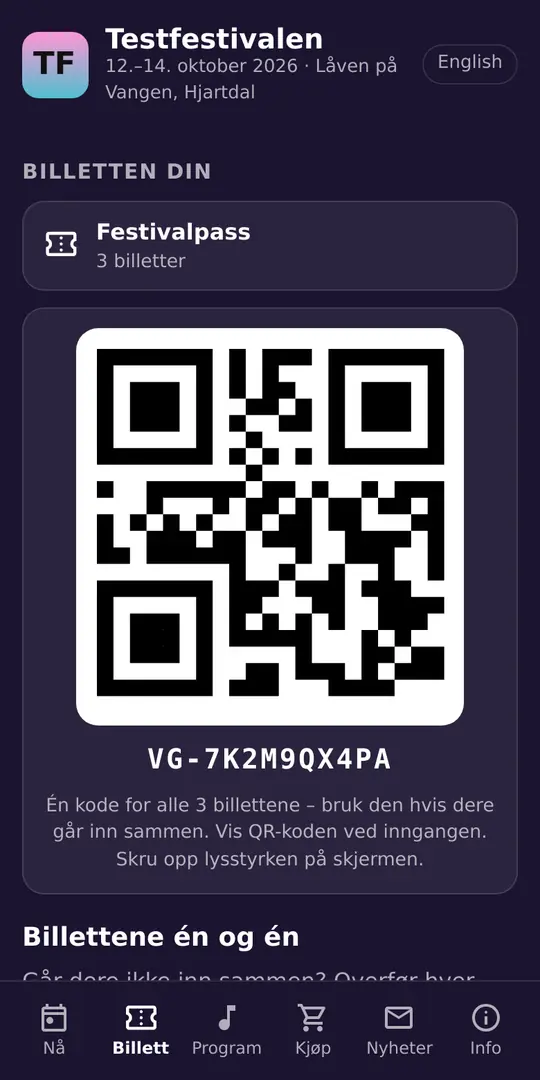
The ticket in the app
The buyer opens the link in the order confirmation, and the ticket is added with a large QR code. It is stored on the phone and can be shown offline.
Share tickets one by one
If someone buys four tickets, each ticket gets its own code. The buyer passes them on with a name, and the recipient gets the ticket in their own app.
Safe transfers
Once the recipient has added the ticket, the transfer is final. When a ticket is passed on, the old code stops working.
The ticket follows the account
If the audience logs in to Kulturella with the email they bought with, the ticket appears by itself. We only store a checksum of the address.
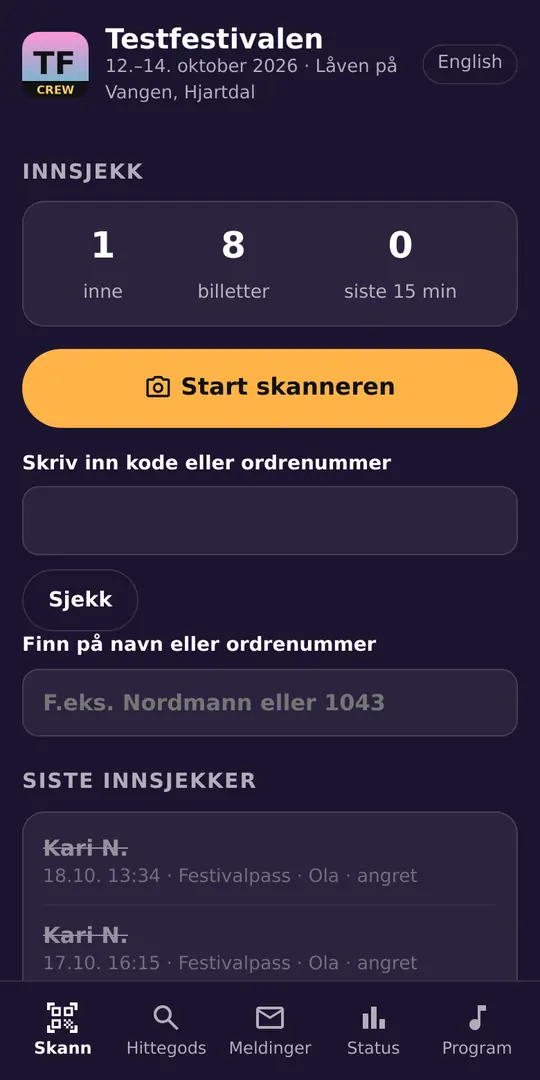
Scanning with the phone camera
The crew scans with the camera on their own phone, or looks up a name or order number. Used and invalid tickets are clearly marked.
More about the crew app →Offline check-in
The ticket list is downloaded to the crew phones. If the network drops, check-in carries on, and it is sent when coverage returns.
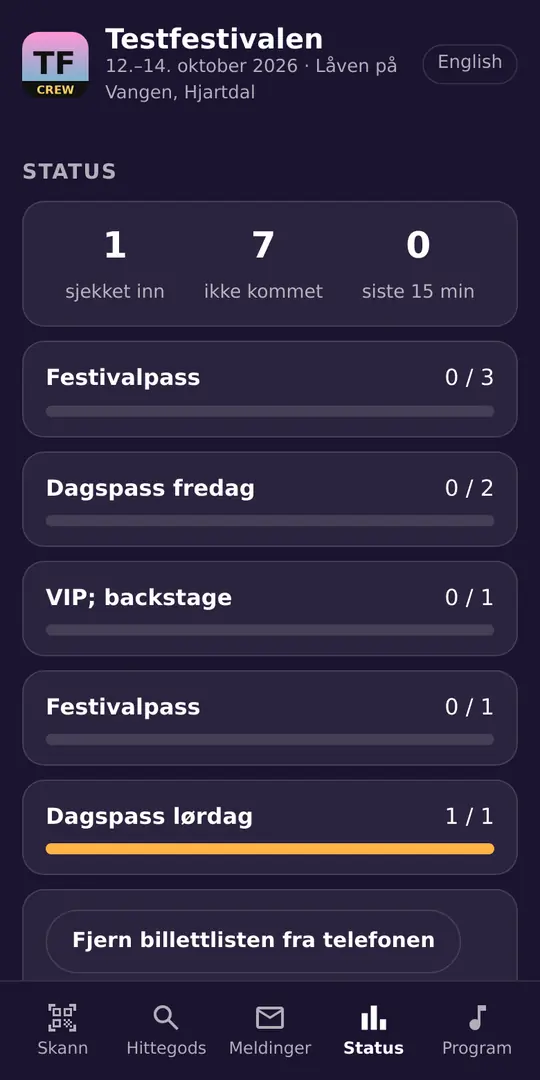
More about the crew app →Live overview
See how many are inside, how many arrived in the last quarter of an hour, and how many are missing per ticket type.
Undo a check-in
If the wrong ticket was checked in, the crew can undo it within 15 minutes. The ticket then becomes valid again.
How to get started
- Connect the ticketing system you use in the Vangen panel, or upload the ticket list as a file.
- Add the app link to the purchase confirmation, where the ticketing system allows it. The panel shows the text or block for each system.
- Give the crew access, and ask them to open the crew app before the doors open so the ticket list is downloaded.
At the entrance
When the crew scans a code covering several tickets, the app shows how many are left on the order and whether any tickets have been passed on. People who have been given a ticket scan their own code.
Offline, the crew phone checks the number of tickets per order. Online, every single ticket is checked.
Pricing
Clubs and associations: NOK 900 billed yearly. Public bodies from NOK 167 per month (NOK 1,999 billed yearly). Businesses from NOK 199 per month (billed monthly).
Vangen is included in the membership. The price depends on the number of users and the type of organisation.
See all prices for membership →Adds temporary crew for the event days. Covers one event for one season.
Pilot: If your organisation starts a paid membership before 1 April 2027, the event add-on is free until 30 September 2027 – the whole festival season. The offer applies to paid memberships, not free trials.
Questions and answers
Which ticketing systems work with Vangen?
Vangen fetches the tickets from the ticketing system you already use – directly from TicketCo, Checkin, Eventbrite, DICE, Billetto, Ticketbutler, WordPress (Event Tickets), Stripe and Shopify, or as a file from Tikkio, Hoopla, Resident Advisor, WooCommerce (FooEvents), Ticketmaster and others. With a direct connection, new purchases are fetched automatically.
Can we sell tickets in Vangen?
No. You keep selling tickets where you do today. Vangen takes over after the purchase: the ticket in the app, sharing and scanning at the entrance.
Do we need dedicated scanners?
No. The crew uses the camera on their own phone in the crew app, which can be added to the home screen.
What happens if the network drops at the entrance?
Check-in carries on with the downloaded ticket list. The check-ins are sent when the phone is back online.
Can a ticket be used twice?
No. Each ticket admits one person. A shared code for several tickets admits as many people as were bought.
What does it cost?
Vangen is included in the organisation membership on Kulturella. Clubs and associations pay from NOK 75 per month (NOK 900 billed yearly), public bodies from NOK 167 per month (NOK 1,999 billed yearly) and businesses from NOK 199 per month (billed monthly). Temporary crew for the event days is an event add-on of NOK 1,500 per event. If your organisation starts a paid membership before 1 April 2027, the event add-on is free until 30 September 2027 – the whole festival season. The offer applies to paid memberships, not free trials.
Give your next event its own app
Create your organisation, open Vangen in your community and build the app. If you have questions, we are happy to talk.